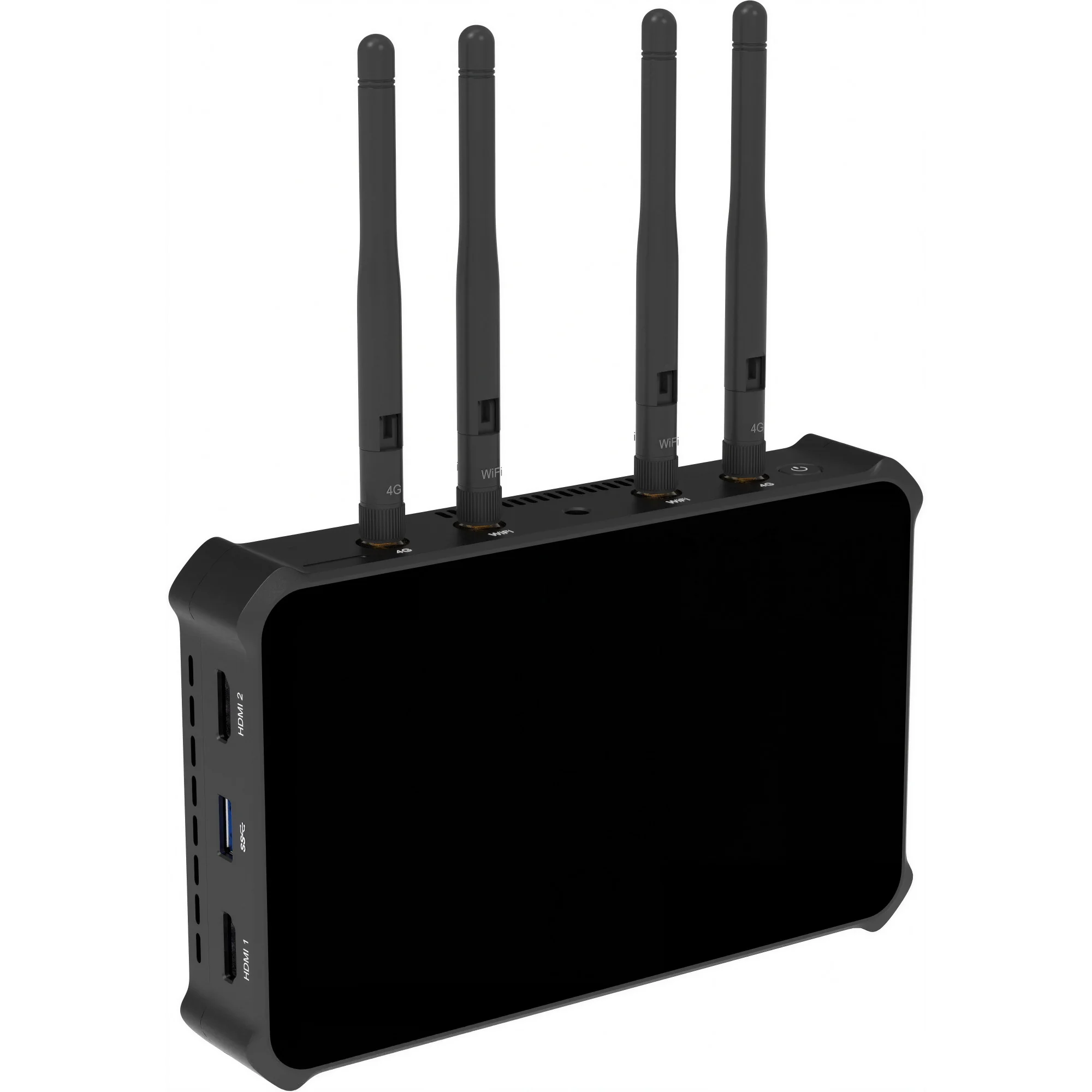
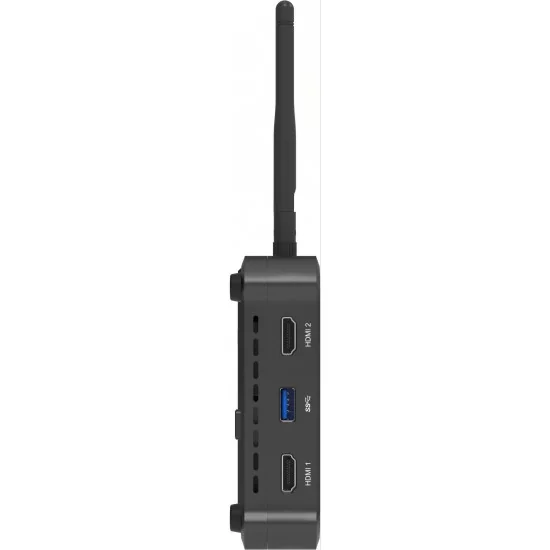
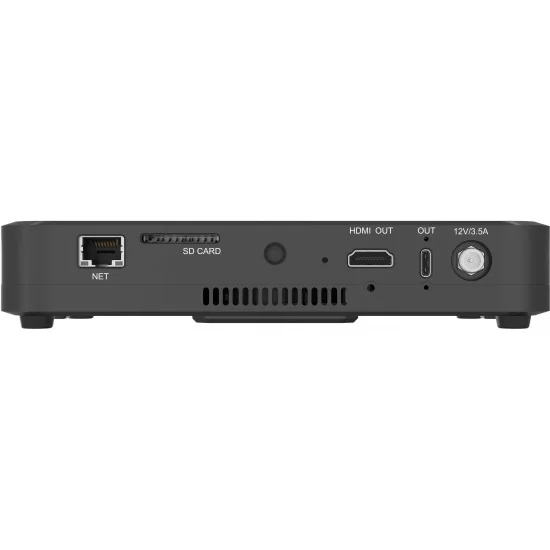
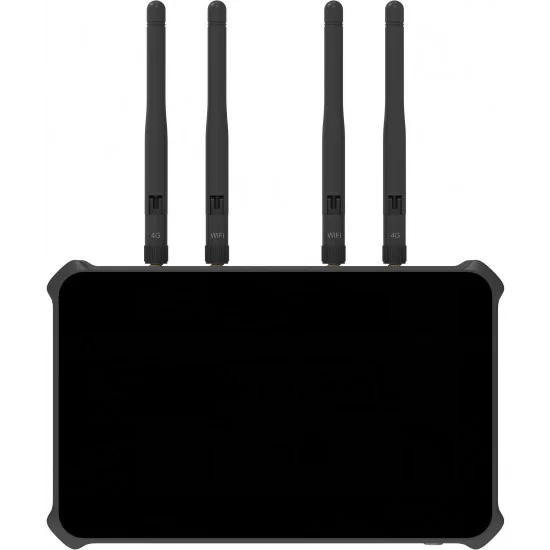
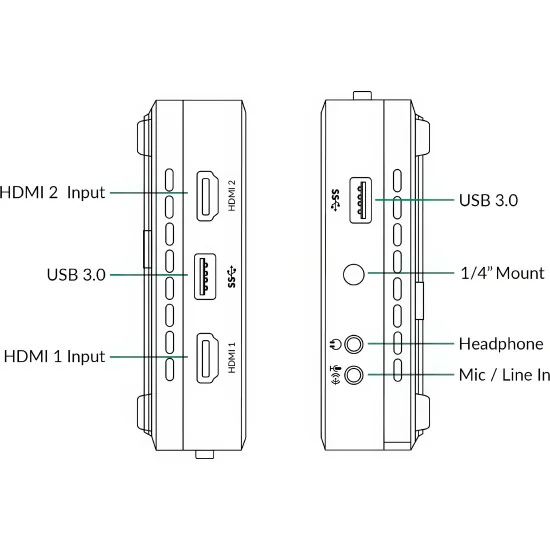
Le Magewell Director One est un mélangeur de production en direct compact réunissant commutation vidéo multi-sources, encodage H.264 et H.265, enregistrement et streaming simultané dans un boîtier portable doté d'un écran tactile AMOLED 7 pouces à 800 nits et un contraste de 100 000:1. Deux entrées HDMI 2.0 acceptent des signaux jusqu'en 4K à 60 ips, trois ports USB 3.0 accueillent webcams et microphones, et trois sources vidéo IP simultanées arrivent en NDI (HX, HX3, pleine bande passante), SRT, RTMP ou RTSP.
L'encodeur atteint 62 Mbps en NDI HX3 et 30 Mbps sur les autres protocoles, de 360p à 1080p jusqu'à 60 ips. Le streaming cible quatre destinations à la fois grâce à YouTube Live, Facebook Live et Twitch natifs, plus des endpoints RTMP et SRT dédiés. L'enregistrement repose sur 64 Go de stockage interne ou une carte SD jusqu'à 128 Go, avec un mode d'enregistrement ISO capturant la sortie programme et une entrée sélectionnée en parallèle — essentiel pour les diffuseurs sportifs et équipes événementielles.
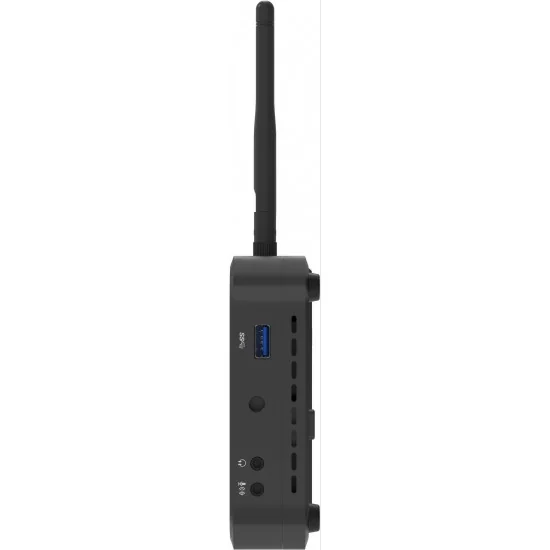
Sur le Magewell Director One, les outils de production vont bien au-delà de la commutation : incrustation chromatique, télestration en temps réel, habillages graphiques dont bandeaux-titres et tableaux de score, contrôle de caméras PTZ via VISCA UDP et replay instantané pour les temps forts. Le mixage audio couvre toutes les entrées avec réglage par canal, délai réglable et écoute sur sortie casque 3,5mm. Le Wi-Fi bibande, l'Ethernet et un modem 4G avec agrégation de liens assurent la connexion là où l'internet reste aléatoire.
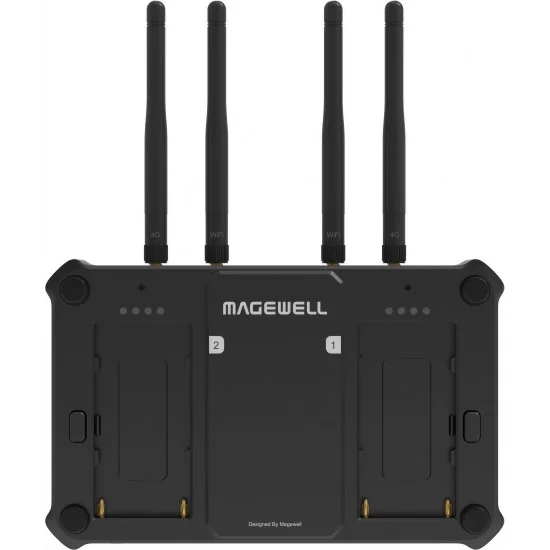
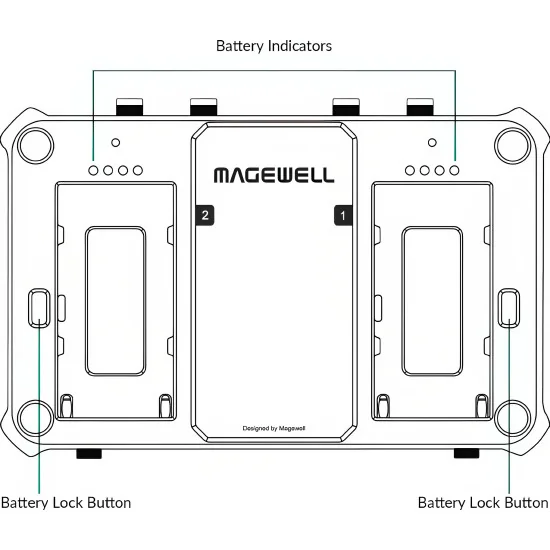
Le pilotage distant passe par l'application Director Utility pour iOS et Android ou une interface Web. Deux emplacements batteries NP-F interchangeables à chaud avec LED de tally garantissent l'autonomie sur le terrain, et les opérateurs peuvent associer l'appareil à un Elgato Stream Deck, des X-Keys ou le protocole OSC pour le contrôle physique.
Le Magewell Director One est un mélangeur de production en direct compact réunissant commutation vidéo multi-sources, encodage H.264 et H.265, enregistrement et streaming simultané dans un boîtier portable doté d'un écran tactile AMOLED 7 pouces à 800 nits et un contraste de 100 000:1. Deux entrées HDMI 2.0 acceptent des signaux jusqu'en 4K à 60 ips, trois ports USB 3.0 accueillent webcams et microphones, et trois sources vidéo IP simultanées arrivent en NDI (HX, HX3, pleine bande passante), SRT, RTMP ou RTSP.
L'encodeur atteint 62 Mbps en NDI HX3 et 30 Mbps sur les autres protocoles, de 360p à 1080p jusqu'à 60 ips. Le streaming cible quatre destinations à la fois grâce à YouTube Live, Facebook Live et Twitch natifs, plus des endpoints RTMP et SRT dédiés. L'enregistrement repose sur 64 Go de stockage interne ou une carte SD jusqu'à 128 Go, avec un mode d'enregistrement ISO capturant la sortie programme et une entrée sélectionnée en parallèle — essentiel pour les diffuseurs sportifs et équipes événementielles.
Sur le Magewell Director One, les outils de production vont bien au-delà de la commutation : incrustation chromatique, télestration en temps réel, habillages graphiques dont bandeaux-titres et tableaux de score, contrôle de caméras PTZ via VISCA UDP et replay instantané pour les temps forts. Le mixage audio couvre toutes les entrées avec réglage par canal, délai réglable et écoute sur sortie casque 3,5mm. Le Wi-Fi bibande, l'Ethernet et un modem 4G avec agrégation de liens assurent la connexion là où l'internet reste aléatoire.
Le pilotage distant passe par l'application Director Utility pour iOS et Android ou une interface Web. Deux emplacements batteries NP-F interchangeables à chaud avec LED de tally garantissent l'autonomie sur le terrain, et les opérateurs peuvent associer l'appareil à un Elgato Stream Deck, des X-Keys ou le protocole OSC pour le contrôle physique.
Livraison dans toute l’UE pour 20 €, gratuite dès 1 000 €.
Boutique B2B réservée aux professionnels, prix HT.
Distribution et garantie officielles de l'UE.
Paiements en ligne sécurisés via Stripe.
Demande de devis via formulaire ou e-mail: avgear@avgear.shop
The Director One is a powerful and versatile production device designed for live event streaming, remote production, and content creation. Featuring a large 7" AMOLED touchscreen with vibrant visuals and superior contrast, it provides an expansive view for seamless control and monitoring. Equipped with integrated 4G modem support and Wi-Fi connectivity, Director One offers flexible networking options, ensuring stable and reliable connections in any environment. It is well-suited for multi-input switching, graphics, streaming, recording, and monitoring, offering extensive input flexibility and advanced production tools.
Director One allows operators to easily switch between HDMI, USB AV, and IP video inputs, supporting up to three simultaneous live IP sources, including SRT, RTMP, RTSP, NDI® High Bandwidth, and NDI® HX sources. It also supports media files, webpages, and HTML graphics as additional inputs. The device enables the creation of engaging multi-camera content with chroma keying, graphics, telestration, and multi-view layouts, making it a perfect choice for sports, live event streaming, and remote production.
The device offers high-quality streaming up to 1080p at 60fps with bitrates up to 30Mbps via RTMP, SRT, or NDI® HX3. It also features ISO recording, allowing users to record two different sources simultaneously or with different quality settings. Director One's flexible control options include a 7" AMOLED touchscreen, external touchscreen monitors, Elgato Stream Deck controllers, USB or Bluetooth devices, and APIs for third-party integrations.
Director One Specifications
Video Input
HDMI
Port: 2x HDMI 2.0 Type-A port
Typical resolution/frame rate:
4096x2160p/3840x2160p 23.98/24/25/29.97/30/59.94/60
1920x1080p 23.98/24/25/29.97/30/50/59.94/60
1920x1080i 25/29.97/30
1280x720p 23.98/24/25/29.97/30/50/59.94/60
720x576p 50/100
720x576i 25/50
720x480p 59.94/60
720x480i 29.97/30
Color depth: 8/10/12-bit
Color sampling: RGB 4:4:4, YCbCr 4:4:4, YCbCr 4:2:2
USB
Port: 2x USB 3.0 Type-A port, 1x USB 3.0 Type-C port
Format: YUYV, MJPG, NV12, UYUV
Resolution/frame rate:
Single USB-A input: Up to 1920x1080p, 60fps
Single USB-C input: Up to 1920x1080p, 60fps
Dual USB-A input: Up to 1920x1080p, 50fps + 1920x1080p, 30fps
One USB-A input + one USB-C input: Up to 1920x1080p, 60fps + 1920x1080p, 60fps
Phone Camera
Connection mode: LAN, Wi-Fi
Codec: H.264, H.265
Resolution/frame rate: Up to 1080p, 60fps
SRT Caller/Listener
Codec: H.264, H.265
Resolution/frame rate: Up to 1080p, 60fps
RTMP Pull/Push
Codec: H.264
Resolution/frame rate: Up to 1080p, 60fps
RTSP stream
Codec: H.264, H.265
Resolution/frame rate: Up to 1080p, 60fps
NDI® stream
NDI HX2, NDI HX3, NDI High Bandwidth
Codec: H.264, H.265, SpeedHQ
Resolution/frame rate: Up to 1080p, 60fps
Video
Resolution: Up to 4K
Codec: H.264, H.265
Format: MOV/MP4/WebM
Picture
Format: JPEG/PNG/BMP
Webpage
Supports adding up to 3 webpages as scenes and 7 webpages as GFXs
Audio Input
Mic/line in: 1x 3.5mm jack, 2-channel, 48 KHz, 16-bit
Audio input from HDMI port: 2-channel, 48 KHz, 16-bit
Audio input from USB port: 2-channel, 48 KHz, 16-bit
Audio input from Bluetooth device: 2-channel, 48 KHz, 16-bit
Audio input from phone
Audio from SRT stream
Audio from RTMP stream
Audio from RTSP stream
Audio from NDI stream
Audio embedded in video files
Audio from a webpage
Background music (BGM): MP3, M4A, WAV files
Audio from GFX: webpage, NDI, video
Video Output
Streaming and recording
Codec: H.264, H.265
Resolution: 1080p, 720p, 540p, 360p*
* 360p is only available for NDI
Frame rate: 60/59.94/50/30/29.97/25/24/23.98/15 fps (Encoding options change along with the frame rate of the show.)
Bitrate:
NDI HX3: up to 62.0Mbps, down to 1.5Mbps
Others: up to 30.0Mbps, down to 256kpbs
Key frame interval: customizable
Profile:
H.264: High profile, Main profile, Baseline profile
H.265: Main profile
Level:
H.264: 5.2, 5.1, 5.0, 4.2, 4.1, 4.0, 3.2, 3.1, 3.0
H.265: 6.1, 6.0, 5.2, 5.1, 5.0, 4.1, 4.0, 3.1, 3.0
Bitrate mode: VBR, CBR
USB-C
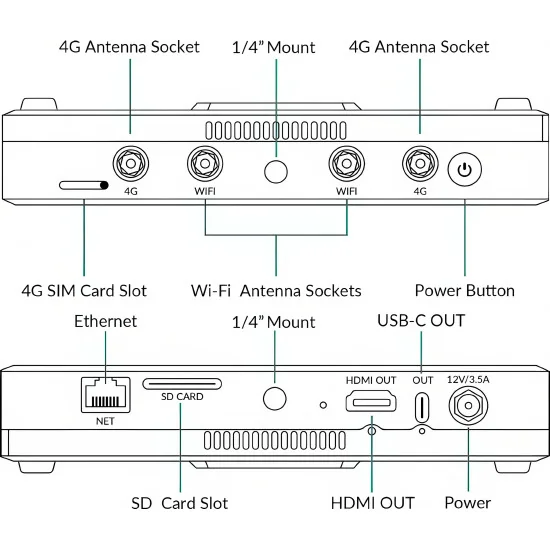
Port: 1* USB 3.0 Type-C port
Output mode: UVC 1.1/UAC 1.0, DP-OUT
Resolution: 1920x1080, 1280x720, 1080x1920, 720x1280
Frame rate: 60/59.94/50/30/29.97/25/24/23.98 fps
Sampling format: RGB24, YUYV, NV12
HDMI OUT
Port: 1* HDMI 2.0 Type-A port
Resolution: 1920x1080
Frame rate: 60fps, 50fps
Sampling format: RGB 4:4:4
Audio Output
Streaming and recording: 2-channel, 16-bit, 48 KHz, aac, 64kbps/96kbps/128kbps
Headphone output: 1x 3.5mm jack, 2-channel, 48 KHz, 16-bit
Audio output via Bluetooth device: 2-channel, 48 KHz, 16-bit
Audio output via USB-C port: 2-channel, 48 KHz, 16-bit
Audio output via USB-A port: 2-channel, 48 KHz, 16-bit/24-bit/32-bit
Audio output via HDMI OUT port: 2-channel, 48 KHz, 16-bit
Features of USB-A Port
Connect to a USB A/V device, such as webcam, USB microphone, USB speaker, etc.
Connect to a USB modem
Connect to a USB flash drive
To transfer video, picture, audio and other media files, firmware update files, log files, etc.
Supported system format: FAT32, exFAT and NTFS
Connect to a USB keyboard for shortcuts
Features of USB-C OUT Port
Connect to a computer
UVC/UAC mode*: Output audio and video to streaming software
* To transfer video at full frame rate, please use a USB 3.0 cable to connect the USB 3.0 port of your computer.
MTP mode: Transfer video, picture, audio and other media files, firmware update files, log files, etc.
Connect to other USB devices, such as USB A/V devices, USB keyboard
Connect to an external screen (settings requried)
Connection mode: Connect the device to a monitor with a USB-C to HDMI/VGA/DP adapter
A/V display mode options: Program, Preview, Multi-view, Duplicate Screen, Loop HDMI 1, Loop HDMI 2
Image rotation: Rotate 90° to left, or rotate 90° to right
Supports using an external touchscreen to control the device in the Duplicate Screen mode
Features of HDMI OUT Port
Connect to an external screen
A/V display mode options: Program, Preview, Multi-view, Duplicate Screen, Loop HDMI 1, Loop HDMI 2
Image rotation: Rotate 90° to left, or rotate 90° to right
Controlling the device via an external touchscreen: Connect the device with an external touchscreen via the HDMI OUT port and USB port and select the Duplicate Screen mode
Network
Supports network bonding (not available in China’s Mainland)
Supports Ethernet, Wi-Fi and Cellular
Ethernet: 1x RJ45 port, 10/100/1000 Mbps Base-T
Wi-Fi: 2.4G/5G, Station and Hotspot modes supported
Cellular: 1* 4G SIM card slot
USB modem supported (not supplied)
Supports Bluetooth for audio input or output with Bluetooth devices, and also supports Bluetooth keyboard, etc.
Bluetooth: BT 5.0
Supports USB tethering to share the Internet data connection of a mobile phone by connecting the phone with the device through a USB cable.
Features
Show
Supports creating multiple shows in landscape (16:9) or portrait (9:16) mode, and manage them
Supports creating shows at 60/59.94/50/30/29.97/25/24/23.98 fps
Scenes
Supports creating multiple scenes in a show, and managing them
Supports adding various sources, including HDMI, WEBCAM, video, picture, RTMP/ SRT/RTSP/NDI stream*, phone camera, webpage, text and color
* It supports adding up to three simultaneous live IP sources (SRT, RTMP, RTSP, NDI® High Bandwidth, NDI® HX2, NDI® HX3) in one show.
Supports browsing webpage sources
Supports multi-view composition in one scene, providing prebuilt layouts for easy creation
Provides lots of editing tools, including chromakey, crop, transition, etc.
Supports switch scenes directly or preview at first and then switch
Supports switching scenes with an instant cut or various effects, such as Fade, DIP, DVE, etc.
Audio
Supports displaying level and peak through audio meter
Supports adjusting the level of each input audio, output and monitor audio
Supports global or scene-based settings for audio input sources
Supports AFV (Audio-follow-video)
Supports solo monitor
Supports switching monitor device
GFX
Supports multiple GFX types, including title, lower third, animated text, digital clock, analog clock, bullet list, social media, logo, scoreboard, timer, stopwatch, etc.
Supports custom GFX with HDMI source, Webcam source, video, picture, text or PAG (Portable Animated Graphics) file
Supports webpage source as GFX
Supports NDI stream as GFX
Supports displaying multiple GFXs, and managing them
Supports controlling scoreboard, timer and stopwatch in real time
BGM
Supports adding BGM for each scene and controlling in real time
Supports adding global BGM via Web UI and controlling in real time
Pen
Annotates on the screen in real time
PTZ control
Supports controlling PTZ camera via the network, supporting Visca UDP, supported sources including HDMI, WEBCAM (UVC camera), SRT stream, RTMP stream, RTSP stream and NDI stream
Phone Camera control
Control the phone camera to zoom or focus, and supports more advanced settings
Replay
Capture some of greatest moments, slow down the action and save highlights.
Live stream
Natively supports streaming to YouTube, Twitch and Facebook Live
Supports selecting RTMP or HLS protocol for streaming to YouTube
Supports starting a stream scheduled later for YouTube
Supports streaming via SRT, RTMP, RTMPS and RTSP protocols
Supports NDI HX3 output, supporting NDI Tally lights
Supports customizing encoding parameters and selecting video source (Program, HDMI, WEBCAM, Multi-view) and audio source for ISO streaming
Supports streaming to four destinations simultaneously
Supports sending live comment as an overlay into the video feed when streaming to social media
Record
Supports customizing encoding parameters
Supports ISO recording, to record two of different video sources simultaneously, or record two-channel images with different quality for one source, combining different audio sources, and supported video sources include Program, HDMI, WEBCAM, Multi-view as well as NDI HX2 and NDI HX3 stream
Supports saving recording files in MP4 or MOV format to local storage or SD card
Supports saving screenshot files in PNG format to local or SD card
Supports splitting recording files by time or size, up to 4 hours or 16G
Supports exporting or downloading files through computer, SD card, USB flash drive, App, or Web UI
Shortcut
Supports connecting USB or Bluetooth keyboards and creating shortcuts for easy control
Director Utility App
OS version: iOS 13 and later, Android 7.0 and later
Remote Assistant: Control Director device remotely
View live program image
Create, switch and manage scenes, set switch mode and effect, implement FTB, freeze scene, and control PTZ camera and phone camera
Switch and manage GFX, edit GFX text and picture in real time, and control scoreboard, timer and stopwatch
Control audio, including adjusting audio level, switch monitor device, mute audio and monitor audio exclusively
Start/stop recording, take screenshots, and manage album files
Set streaming servers, start/stop streaming, view streaming status, and send live comment as overlay
Control replay and share event files to other apps
Control and manage BGM
Create, manage and execute shortcuts functions
View input information
View real-time device status
Power off the device remotely
Phone Camera: Use a mobile device (phone or tablet) as a camera
Stream images taken by the mobile device to Director device
Record images taken by the mobile device to its local storage
Stream images taken by the mobile device to a destination via SRT
Supports Pro Mode to customize white balance, ISO, exposure, focus, etc.
Supports selecting the USB camera connected to the iPad with a USB-C port (iPadOS 17 and above).
External Screen: Suitable for tablets equipped with a USB-C interface (USB 3.0 and above). For iPads, iPadOS17 and above are required.
Display different images including program, preview, multi-view, duplicate screen, loop HDMI 1, and loop HDMI 2.
Record or take screenshots of the displayed content and save them to the tablet
Control the device via the tablet using the “Duplicate Screen” function
Web UI
Set and manage device, view input information, configure networks, update firmware, etc.
Preview and monitor the show, switch and manage shows, scenes and GFXs, control audio, set shortcuts, send live comment as overlay, control replay, etc.
Set encoding parameters
Set streaming servers, start/stop streaming, view streaming status
Start/stop recording, take screenshots and manage album files
Control and manage global BGM and scene’s private BGM
Manage media files
Supports registering Magewell Control Hub (V2.1.81 and later) for centralized management
System requirement: Windows 10 19H1 and above, macOS 10.12 and above, Linux
Magewell Director Plugin for Stream Deck: Control Director device effortlessly at fingertips to enable efficient creative production.
API: Provides basic APIs for 3rd party control system
OSC: Supports OSC for 3rd party Apps to control the device
Screen
Size: 7"
Type: AMOLED
Aspect ratio: 16:9
Resolution (dot): 1920(W)x1080(H)
Brightness: 800nit
Contrast ratio: 100000:1
Color gamut: 100% NTSC
sRGB: 145%
DCI-P3: 105%
Color depth: 10-bit
PPI: 315
Refresh rate: 60Hz, 50Hz
Touchscreen: Capacitive
Viewing direction: All
Screen coating: Anti-fingerprint coating
Storage: Local storage: 64 GB, SD card (not supplied): FAT32 (Under 128G), NTFS, exFAT
Physical Specifications: Form factor: 185.2 mm x 117.2 mm x 32.8 mm, Weight: ≈709g (without antennas)
Power
AC power
Power input: 12V/3.5A
Battery pack
2x DC 7.4V (NP-F battery packs, not supplied)
Hot swappable
Power consumption:
No-load: ≈6W
Full-load: ≈27W
LED Lights
Each battery has four LED lights which can be set as battery indicators or NDI tally lights.
Battery indicators (default)
4* Green: 75% - 100%
3* Green: 50% - 75%
2* Green: 25% - 50%
1* Red: <25%
Off: depleted
NDI tally lights
Red: the NDI streaming signal is in PGM view.
Green: the NDI streaming signal is in PVW view.
Working Environment
Operating temperature: –10 to 50 deg C (AC power)
Storage temperature: –20 to 70 deg C
Relative humidity: 5% to 90% non-condensing

Fiche technique
Références spécifiques